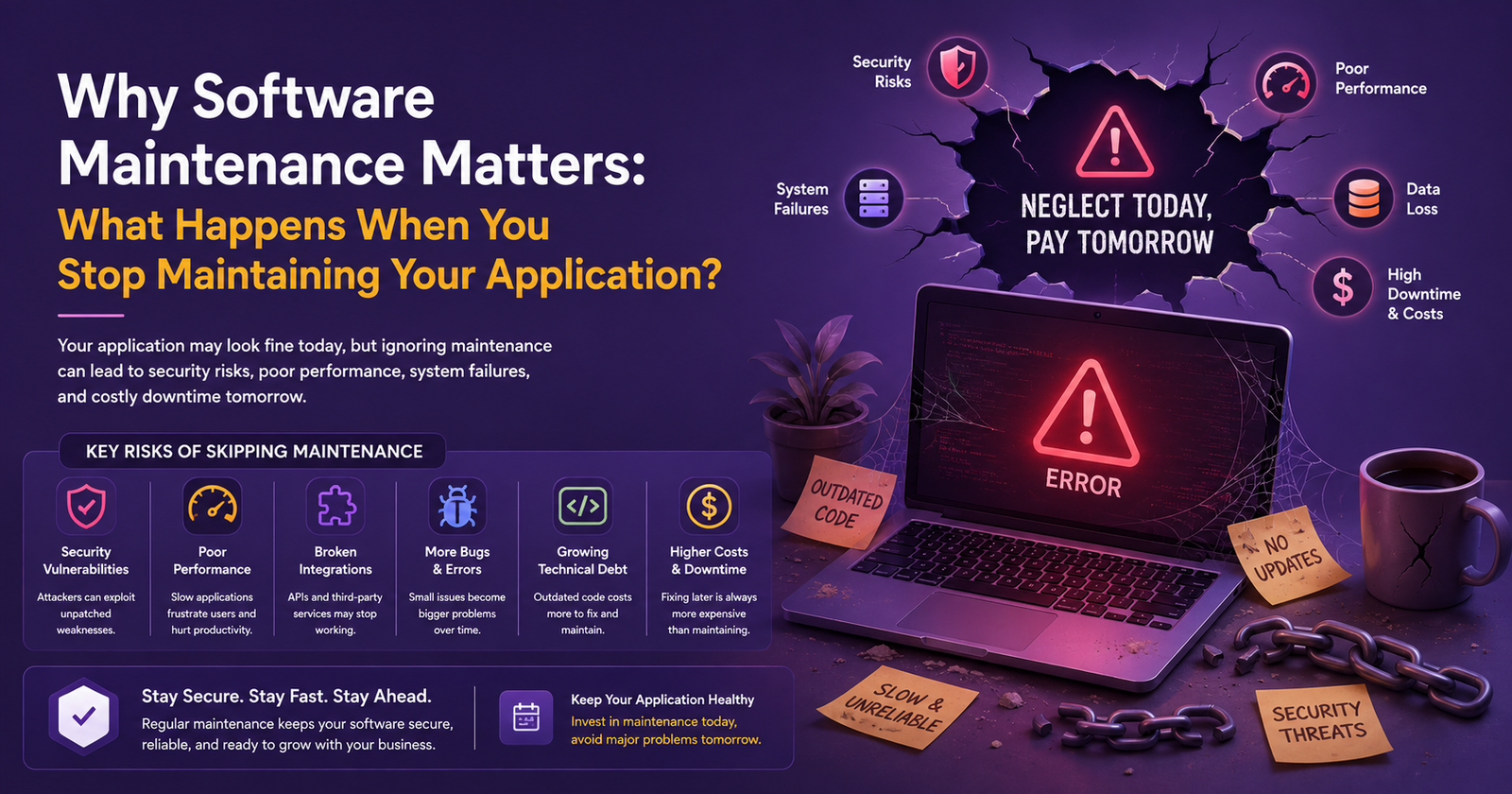
Why Software Maintenance Matters: What Happens When You Stop Maintaining Your Application?
Software does not become outdated only because it looks old.
An application can still have the same interface it had three years ago and appear to be working normally. But underneath, dependencies become outdated, security vulnerabilities appear, servers change, browsers evolve, APIs get updated, databases grow, and business requirements move forward.
That is why software maintenance matters.
Many businesses treat maintenance as something to think about only when an application breaks. In reality, good maintenance is about preventing avoidable problems before they become expensive problems.
If you stop maintaining an application, you may not notice anything immediately. The software might continue working for weeks or even months. Then small issues start appearing: slower pages, failed integrations, unexpected errors, security warnings, broken features, and eventually serious downtime.
The cost of fixing the problem at that stage can be much higher than the cost of maintaining the application in the first place.
What Is Software Maintenance?
Software maintenance is the ongoing work required to keep an application secure, stable, compatible, and useful after it has been launched.
It can include:
- Bug fixing
- Security updates
- Performance optimization
- Dependency and framework updates
- Database maintenance
- Server and cloud maintenance
- Monitoring and error resolution
- API and third-party integration updates
- Feature enhancements
- Backup and recovery
- Compatibility updates
- Technical troubleshooting
Maintenance does not necessarily mean constantly adding new features.
Sometimes the most valuable maintenance work is invisible to users. Updating a vulnerable package, optimizing a slow database query, replacing an outdated dependency, improving logging, or fixing a background job may never appear as a new feature—but it can prevent a major production problem.
Kawach Technology provides [application maintenance and support services] as an ongoing way to handle security updates, bug fixing, performance optimization, monitoring, feature improvements, and technical support.
What Happens When You Stop Maintaining Software?
The problems usually don't arrive all at once.
They build up gradually.
Here are some of the most common things that happen when software maintenance is ignored.
1. Security Vulnerabilities Start Accumulating
This is one of the biggest risks.
Applications depend on frameworks, libraries, operating systems, databases, APIs, plugins, and other components. Security researchers regularly discover vulnerabilities in these technologies.
If your application is not maintained, vulnerable components may remain in production long after security fixes are available.
The risk isn't limited to the software itself. An outdated application may also be running on an outdated server configuration or relying on an old authentication method.
Eventually, the application becomes a much easier target.
Regular maintenance gives development teams an opportunity to review dependencies, apply security patches, update libraries, check configurations, and address known vulnerabilities.
For businesses handling customer information, financial data, documents, or internal company information, this should not be treated as optional housekeeping.
2. The Application Becomes Slower
Performance problems often develop gradually.
A database may contain 10,000 records when an application is first launched. A few years later, it may contain millions.
The code may still be the same, but the workload isn't.
A query that was fast with a small dataset may become slow as the database grows. Large files, unoptimized images, excessive API calls, memory usage, inefficient background jobs, and missing indexes can create additional bottlenecks.
Users usually experience this as:
- Pages taking longer to load
- Slow dashboards
- Delayed searches
- Timeouts
- Slow reports
- Mobile applications taking longer to respond
Performance maintenance helps identify these problems before users start complaining.
3. Third-Party Integrations Stop Working
Modern applications rarely operate alone.
Your application might communicate with:
- Payment gateways
- Email services
- CRM platforms
- Accounting software
- Maps
- Shipping providers
- Social platforms
- AI services
- Analytics systems
- Internal APIs
The problem is that these external services can change independently of your application.
An API version may be deprecated. Authentication requirements may change. A response format may be modified. An endpoint may be removed.
If nobody is maintaining the application, these changes can suddenly break important workflows.
This is one reason maintaining reliable [custom API development services] and integration architecture is important for applications that depend heavily on external systems.
4. Small Bugs Turn Into Bigger Problems
A minor bug is usually easier and cheaper to fix when it is discovered.
The problem is that businesses sometimes ignore small issues because they don't seem important.
For example:
A report occasionally displays incorrect information.
Then another part of the system starts depending on that report.
Later, the incorrect data gets exported.
Someone imports it into another system.
Now the original small bug has become a business data problem.
Regular maintenance helps development teams identify and resolve issues before they spread across the application.
5. Technical Debt Keeps Growing
Technical debt is one of those problems that is easy to ignore because it isn't always visible to customers.
Developers may know that a particular module needs refactoring. A dependency may be several versions behind. An old database structure may make new features unnecessarily difficult.
If maintenance is continuously postponed, these issues accumulate.
Eventually, developers spend more time working around old code than building new functionality.
For example, a feature that should take two days might take two weeks because developers first need to understand and modify an outdated part of the system.
That is when technical debt starts affecting business growth.
6. New Features Become More Expensive
Businesses change.
You may need a new dashboard, mobile application, payment method, reporting system, AI feature, customer portal, or third-party integration.
But adding new functionality to an unmanaged application can be difficult.
Old architecture often creates unexpected dependencies between different parts of the system.
As a result, developers may have to modify multiple areas just to introduce one new feature.
Good maintenance isn't only about fixing today's problems. It also keeps the application in a condition where tomorrow's changes are easier to implement.
7. Compatibility Problems Appear
Technology platforms don't stay still.
Browsers receive updates.
Mobile operating systems change.
PHP, Laravel, Node.js, Python, Java, and other technologies release new versions.
Cloud platforms change their infrastructure and services.
If your application remains untouched, compatibility problems can eventually appear.
A feature that worked perfectly before may start behaving differently after a browser or operating system update.
This is especially important for applications used across multiple devices and platforms.
Ongoing maintenance helps keep web and mobile applications compatible with the environments where customers actually use them.
8. Monitoring and Error Visibility Gets Worse
You can't fix problems you don't know about.
A well-maintained application should have appropriate logging, monitoring, alerts, and operational visibility.
Without these practices, a production problem may only become visible after a customer reports it.
For example, an automated background job might fail every night.
If nobody monitors it, the business may not notice until someone realizes that yesterday's reports were never generated.
Good maintenance includes monitoring important application and infrastructure behavior so that issues can be detected earlier.
9. Backups May Become Unreliable
Backups are often treated as something that can be configured once and forgotten.
They shouldn't be.
Backup systems need to be monitored and tested.
A business might believe it has regular backups, only to discover during an emergency that:
- Backups were failing
- Old backups were being overwritten
- Storage had reached its limit
- Recovery procedures were never tested
- Important files weren't included
Regular maintenance should include reviewing backup processes and recovery procedures.
For critical applications, backup and disaster recovery planning can make the difference between a short incident and a major business disruption.
10. Eventually, the Application Can Become Difficult to Maintain at All
This is where things become expensive.
After years of ignoring updates, security patches, architecture problems, technical debt, and compatibility issues, a development team may find that maintaining the application is no longer straightforward.
Developers may need to upgrade several technologies at once.
A framework upgrade may require code changes across the application.
An old server configuration may need to be replaced.
Third-party integrations may need to be rebuilt.
Database structures may need to be migrated.
Testing becomes more complicated because so many components are changing at the same time.
At this point, the question may no longer be:
"How much will maintenance cost?"
It may become:
"Should we modernize this application or rebuild it?"
Software Maintenance vs. Software Modernization
These two terms are sometimes confused.
They are related, but they aren't the same thing.
Software MaintenanceSoftware ModernizationFix existing bugsReplace or redesign outdated componentsApply security updatesUpgrade architecture and technologyImprove performanceRebuild inefficient partsMaintain integrationsReplace obsolete integrationsMonitor productionIntroduce improved infrastructureAdd smaller enhancementsMake larger structural changesKeep the current system healthyPrepare the system for future growth
Maintenance is generally about keeping an existing application healthy.
Modernization becomes more relevant when the existing architecture itself is preventing the business from moving forward.
In some situations, both are needed.
How Often Should Software Be Maintained?
There isn't one maintenance schedule that works for every application.
A simple internal application may require less frequent attention than a customer-facing SaaS platform processing thousands of transactions.
However, maintenance should generally be continuous rather than something performed only after an outage.
A practical approach is to divide maintenance into different areas:
Regular Monitoring
Check application health, server resources, logs, queues, integrations, and important business processes.
Security Maintenance
Review vulnerabilities, dependencies, authentication, permissions, certificates, and security configurations.
Performance Maintenance
Monitor database performance, response times, memory usage, storage, caching, and application bottlenecks.
Dependency Updates
Keep frameworks, libraries, packages, operating systems, and other dependencies reasonably current.
Backup Checks
Verify that backups are completing successfully and that recovery procedures actually work.
Feature Improvements
Use customer feedback and changing business requirements to improve the application over time.
This approach is much safer than waiting for something to break.
When Should You Consider Professional Application Maintenance?
You should seriously consider a structured maintenance plan if you notice several of these signs:
Warning SignWhat It May IndicateFrequent production bugsGrowing technical debtSlow applicationPerformance bottlenecksOld dependenciesSecurity and compatibility risksFailed API integrationsThird-party changesIncreasing downtimeInfrastructure or application problemsDifficult feature developmentOutdated architectureNo reliable backupsBusiness continuity riskCustomers reporting issues firstLack of monitoringDevelopers afraid to change old codeHigh technical debtEvery update causes new bugsWeak testing or architecture
If several of these are happening at the same time, maintenance should probably move from a reactive activity to a formal engineering process.
Don't Automatically Rebuild Everything
One common mistake is assuming that an old application must be completely replaced.
That's not always true.
Sometimes the existing application has a solid foundation and only needs:
- Dependency updates
- Security improvements
- Database optimization
- Code refactoring
- Infrastructure upgrades
- Better monitoring
- API improvements
- Automated testing
- Performance optimization
In other situations, modernization or a complete rebuild may make more financial sense.
The right decision depends on the application's architecture, technical debt, business importance, operating cost, security risks, and future requirements.
A technical assessment is usually better than making that decision based only on the application's age.
What Does a Good Software Maintenance Plan Include?
A useful maintenance plan should go beyond "fix bugs when something goes wrong."
It should define what is being monitored, how frequently systems are reviewed, who responds to incidents, and how improvements are prioritized.
A practical maintenance plan may include:
Application health: Monitor errors, response times, failed jobs, and important workflows.
Security: Review vulnerabilities, dependencies, authentication, permissions, and infrastructure.
Performance: Track database queries, resource usage, caching, and application response times.
Infrastructure: Maintain servers, cloud resources, SSL certificates, deployment environments, and backups.
Integrations: Check external APIs and services for compatibility and failures.
Testing: Maintain regression, API, functional, and automated tests so updates don't introduce new problems.
Documentation: Keep technical and operational documentation updated as the application changes.
Future improvements: Reserve time for refactoring and technical debt instead of spending every development cycle only on new features.
How QA Fits Into Software Maintenance
Maintenance without testing can create another problem.
You fix one issue and accidentally break something else.
This is especially common in older applications where different modules have hidden dependencies.
That is why [QA and software testing services] should be part of an ongoing maintenance strategy.
Regression testing, API testing, functional testing, performance testing, security testing, and automated testing can help verify that maintenance changes haven't damaged existing functionality.
The goal isn't to test everything manually every time.
The goal is to create enough automated and manual coverage around important parts of the application that developers can make changes with confidence.
DevOps Also Plays an Important Role
Maintenance becomes much easier when deployment and infrastructure are properly managed.
With a strong [DevOps and platform engineering approach], businesses can improve areas such as CI/CD, infrastructure management, containerization, monitoring, deployment processes, and cloud operations.
Instead of manually changing a production server every time an update is required, a well-designed deployment pipeline can make releases more predictable and repeatable.
That matters when an application needs frequent security patches or updates.
A Real Example of Why Maintenance and Architecture Matter
Kawach's work on a real estate property management platform shows the kind of operational problems that can appear when business processes are spread across disconnected systems.
The client was managing thousands of properties using spreadsheets, emails, third-party CRMs, and manual documentation. The resulting workflow made lead tracking, property management, scheduling, and reporting difficult.
Kawach developed a centralized platform covering property management, CRM, appointments, document management, communications, and analytics. The resulting platform reported improvements including faster lead response, reduced administrative workload, faster property search, and improved digital adoption.
The important lesson isn't that every business needs a completely new platform.
It's that software should evolve with the business.
Sometimes that means maintaining the current application. Sometimes it means improving its architecture. And sometimes the existing system has reached the point where modernization makes more sense.
The Cost of Not Maintaining Software
Maintenance is an expense.
But ignoring maintenance doesn't make that expense disappear.
It usually moves the cost somewhere else.
You may eventually pay through:
- Emergency development work
- Extended downtime
- Lost customers
- Security incidents
- Failed integrations
- Data recovery
- Expensive modernization
- Slower development
- Poor customer experience
- Missed business opportunities
The exact cost is different for every business, but the pattern is common:
Small, planned maintenance costs are usually easier to manage than large, unexpected technical problems.
Final Thoughts
Software isn't a product you build once and forget.
The business changes. Customers change. Technology changes. Security threats change. Infrastructure changes.
Your application needs to change with them.
Stopping maintenance may not cause an immediate disaster. That's what makes it dangerous. The application can appear perfectly fine while technical debt, security risks, outdated dependencies, and performance problems quietly accumulate.
Eventually, those problems become visible—and by then, fixing them can be considerably more complicated.
A better approach is to treat software maintenance as part of the application's lifecycle from the beginning.
If your application is already showing signs of aging, you don't necessarily need to replace everything. Start by assessing the current system, identifying the highest-risk areas, and deciding what should be maintained, modernized, or rebuilt.
Kawach Technology provides ongoing [application maintenance and support] for businesses that need help keeping existing web, mobile, and business applications secure, stable, and ready for future changes. The team also supports custom software development, API development, DevOps, QA, and application modernization depending on the application's requirements.
If your existing software is becoming harder to manage, the earlier you address the problem, the more options you usually have.
Be the first to comment.