Modernizing Case Management for Sterling & Cross Legal Partners Across 5 Offices Modernizing Case Management for Sterling & Cross Legal Partners Across 5 Offices
1 0 1 1 0 0 1 0
0 1 0 0 1 1 0 1
1 1 0 1 0 1 1 0
0 0 1 0 1 0 0 1
Back to Case Studies
Case Study: Corporate Law

Modernizing Case Management for Sterling & Cross Legal Partners Across 5 Offices

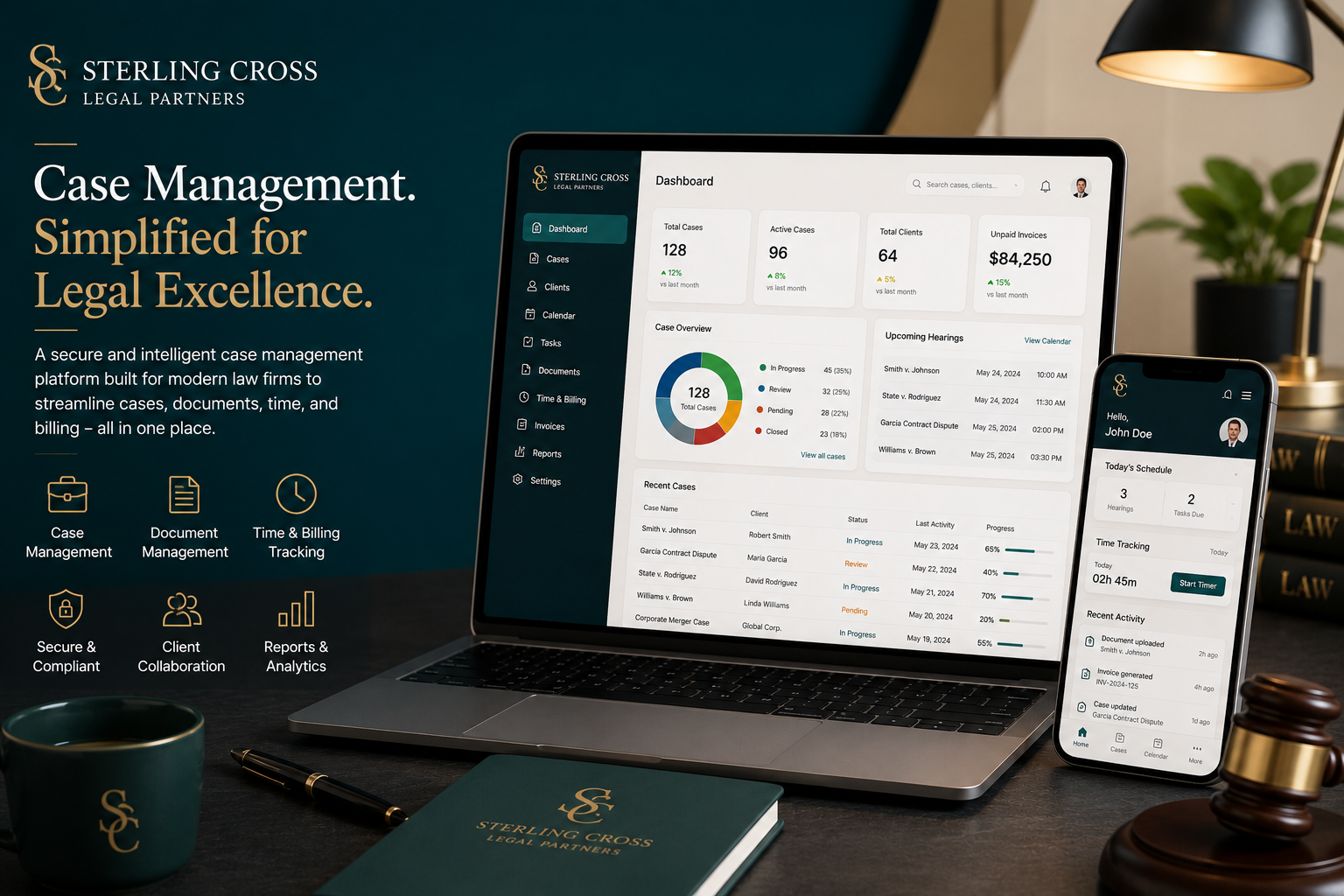
How Kawach Technology built a centralized case management platform for Sterling & Cross Legal Partners, cutting billing cycle time 60% across 5 offices.

Corporate Law 9 months May 2025
Explore Project
-60%
Billing Cycle Time
Days → Minutes
Conflict Check Time
-90%
Document Version Errors
100%
Associate Utilization Visibility

Client Overview

Sterling & Cross Legal Partners

Sterling & Cross Legal Partners has 140 attorneys spread across five U.S. offices, and until recently, "where is the file for this case" didn't have a reliable answer. Case documents were scattered across shared network drives, email threads, and individual attorneys' personal folders — a filing system that worked well enough for any one attorney's own matters but fell apart the moment a case...

Industry
Corporate Law
Business Size
140 attorneys, 5 U.S. offices
Location
New York, New York, USA · Software development in the USA
Business Model
Corporate Law Firm
Project Duration
9 months
Existing Challenges
  • Case files were scattered across shared network drives, email threads, and individual attorneys' personal folders.
  • Billable hours were tracked in spreadsheets, and reconstructing a month's billing for a client took days.
  • Conflict-of-interest checks before accepting a new client were done manually by searching old files and asking around.
  • Multiple attorneys editing the same document led to constant version confusion and occasionally lost edits.
  • Partners had no consolidated view of case status or associate workload across the firm's 5 offices.
The Challenge

What We Were Up Against

Sterling & Cross Legal Partners has 140 attorneys spread across five U.S. offices, and until recently, "where is the file for this case" didn't have a reliable answer. Case documents were scattered across shared network drives, email threads, and individual attorneys' personal folders — a filing system that worked well enough for any one attorney's own matters but fell apart the moment a case needed input from colleagues in another office.

Billing was tracked in spreadsheets attorney by attorney, which meant reconstructing a single client's monthly bill could take days of cross-referencing multiple people's records. Conflict-of-interest checks — a genuinely serious obligation before accepting any new client — were done manually, with staff searching old files and asking around the office, an approach that scales badly and carries real risk of missing something.

Day-to-day collaboration had its own friction: multiple attorneys editing the same document via shared drives led to constant version confusion, and more than once, real edits were lost when two people saved over each other's work. And because none of this generated structured data, partners had no consolidated view of case status or associate workload across the firm — decisions about staffing and case assignment were made on incomplete information.

Our Solution

How We Built It

We began with practice-group-level discovery across all five offices, since litigation, M&A, and IP practice groups each organized their case files quite differently — a single rigid taxonomy would have satisfied none of them. What we built instead was a centralized case repository with a flexible-but-structured filing convention, backed by real document version control so simultaneous edits no longer meant a coin-flip on whose changes survived.

The conflict-of-interest database was one of the more sensitive pieces of this project: it needed to be searchable enough to genuinely catch potential conflicts, while respecting the ethical walls that must exist between attorneys working on adverse matters. We built role-based access controls specifically so a conflict search can confirm whether a name appears in the system without exposing the substantive contents of a screened-off matter to someone who shouldn't see it.

Time tracking and billing were automated by tying entries directly to case activity rather than relying on attorneys to reconstruct their day from memory at month's end — a change that alone cut billing cycle time by more than half. On top of all of this, we built a partner dashboard giving firm leadership a real-time view of case status and associate workload across all five offices, replacing what used to require calling each office manager individually.

We piloted the system with two practice groups before firm-wide rollout, deliberately choosing groups with different document-heavy workflows — litigation's discovery-document volume and M&A's contract-negotiation cycles are very different beasts, and the pilot surfaced workflow gaps in each that we could fix before all 140 attorneys were relying on the system.

Key Modules Delivered
Centralized Case Repository
A single, searchable home for case documents replacing drives, email, and personal folders.
Document Version Control
Real version history so simultaneous edits no longer risk lost work.
Automated Time Tracking
Time entries tied directly to case activity rather than end-of-month reconstruction.
Conflict-of-Interest Database
A searchable conflict database respecting ethical walls between screened matters.
Billing & Invoice Generation
Client invoices generated directly from tracked time and case activity.
Partner Dashboard
Real-time case status and associate workload visibility across all 5 offices.
Goals & Objectives

What Success Looked Like

Centralize Case Files

Replace scattered drives and email with one searchable case repository.

Automate Time & Billing

Tie time entries directly to case activity instead of manual reconstruction.

Systematize Conflict Checks

Make conflict-of-interest checks searchable and auditable, not manual and ad hoc.

Give Partners Firm-Wide Visibility

Show case status and associate workload across all 5 offices in real time.

Features Developed

What We Built

Centralized Case Repository

One searchable home for every case file across all offices.

Document Version Control

Real version history eliminating lost-edit conflicts.

Automated Time Tracking

Time entries generated from actual case activity.

Conflict-of-Interest Search

Fast, auditable conflict checks respecting ethical walls.

Partner Dashboard

Firm-wide case status and workload visibility.

Secure Client Portal

A confidential channel for client document sharing.

Technology Stack

Built With the Right Tools

We selected every technology based on this project's real requirements: compliance obligations, scalability needs, and long-term maintainability. No trend-chasing, only battle-tested solutions.

Backend
Laravel PostgreSQL
Search
Elasticsearch (case file & conflict search)
Frontend
Vue.js Tailwind CSS
Integrations
DocuSign Outlook/Exchange sync
Infrastructure
AWS with encrypted storage
Development Process

How We Delivered It

Agile delivery with regular demos and continuous deployment. Full transparency at every stage.

Total Timeline
9 months
Started → Ongoing
1
01
Practice Group Discovery

Studied how litigation, M&A, and IP practice groups organize case files differently across all 5 offices.

2
02
Document Taxonomy & Version Control Design

Designed a flexible-but-structured filing system with real version history.

3
03
Conflict Database Build

Built a searchable conflict-of-interest system respecting ethical walls between screened matters.

4
04
Time & Billing Automation

Tied time entries directly to case activity to eliminate manual end-of-month reconstruction.

5
05
Pilot with 2 Practice Groups

Tested the system with litigation and M&A groups, whose document workflows differ significantly.

6
06
Firm-Wide Rollout & Training

Trained all 140 attorneys across 5 offices in role-specific sessions.

Security & Compliance

Built for the Strictest Standards

Attorney-Client Privilege Protection
Access controls are designed specifically to preserve privilege and confidentiality boundaries.
Ethical Wall Access Controls
Screened matters are access-restricted so conflicted attorneys cannot view substantive case content.
Encrypted Document Storage
All case documents are encrypted at rest and in transit.
Bar Record-Retention Compliance
Document retention policies align with state bar association requirements.
Results / KPIs

Measurable Impact

Numbers measured at 6 months post-launch, independently verified by the client's operations team.

-60%
Billing Cycle Time
Days → Minutes
Conflict Check Time
-90%
Document Version Errors
100%
Associate Utilization Visibility

Before vs. After

Before After
Case files scattered across drives, email, and foldersOne centralized, searchable case repository
Manual spreadsheet billingAutomated time tracking and invoicing
Days-long manual conflict checksSearchable conflict database in minutes
No firm-wide case visibilityPartner dashboard across all 5 offices
"
Every managing partner has a story about a conflict check that took half a day and still felt like a coin flip. Ours is now a search that takes minutes and something we can actually stand behind if questioned. Between that and cutting our billing cycle in half, this was one of the highest-leverage investments the firm has made in years.
MA
Margaret Ellison
Managing Partner, Sterling & Cross Legal Partners
★★★★★
Key Achievements

Why This Project Matters

Beyond the numbers: what this project changed day-to-day for Sterling & Cross Legal Partners and the people who rely on what we built.

Consolidated Files for 140 Attorneys
Case files that were once scattered across drives and inboxes now live in one searchable system.
Billing Cycle Cut by More Than Half
Automated time tracking cut the firm's billing cycle time by 60%.
Conflict Checks: Days to Minutes
What used to take days of manual searching now takes minutes, with a full audit trail.
FAQ

Common Questions

Have more questions? Book a call with our team.

How do ethical walls work within a shared case management system?
Role-based access controls let the conflict database confirm whether a name appears in the system without exposing the substantive contents of a screened-off matter to an attorney who shouldn't see it.
How was years of existing case data migrated?
We migrated practice-group by practice-group rather than all at once, verifying document integrity and access permissions at each stage before moving to the next.
Did attorneys resist moving away from familiar personal folders?
Some did initially — the pilot with two practice groups was partly about working through that resistance and refining the interface before firm-wide rollout, which made adoption smoother than a single company-wide mandate would have.
How is client confidentiality protected in the new system?
All documents are encrypted at rest and in transit, with granular role-based access controls and a full audit trail of who accessed what and when.
Related Case Studies

More Success Stories

Ready to Get Started?

Looking for Custom Corporate Law Software Development?

Kawach Technology helps startups and enterprises build scalable, secure, and high-performance digital platforms. Let's turn your vision into the next success story.

View All Case Studies

Want a similar result for your business? Explore our CRM Development services , or see how we work with businesses in the USA , or get in touch directly.